Performance Review · iRacing

The iRacing Driving Coach
That Tells You Why.

Performance Review is the iRacing lap analysis and driving coach built into Track Impulse. It records every lap while you drive, reads your whole stint instead of one lucky lap, and hands back a corner-by-corner time budget that adds up to your real lap delta. Every finding names the cause, gives you a target, and says what fixing it is worth in seconds.

iRacing Every lap coached Nothing to start or stop Runs on your PC Free during beta
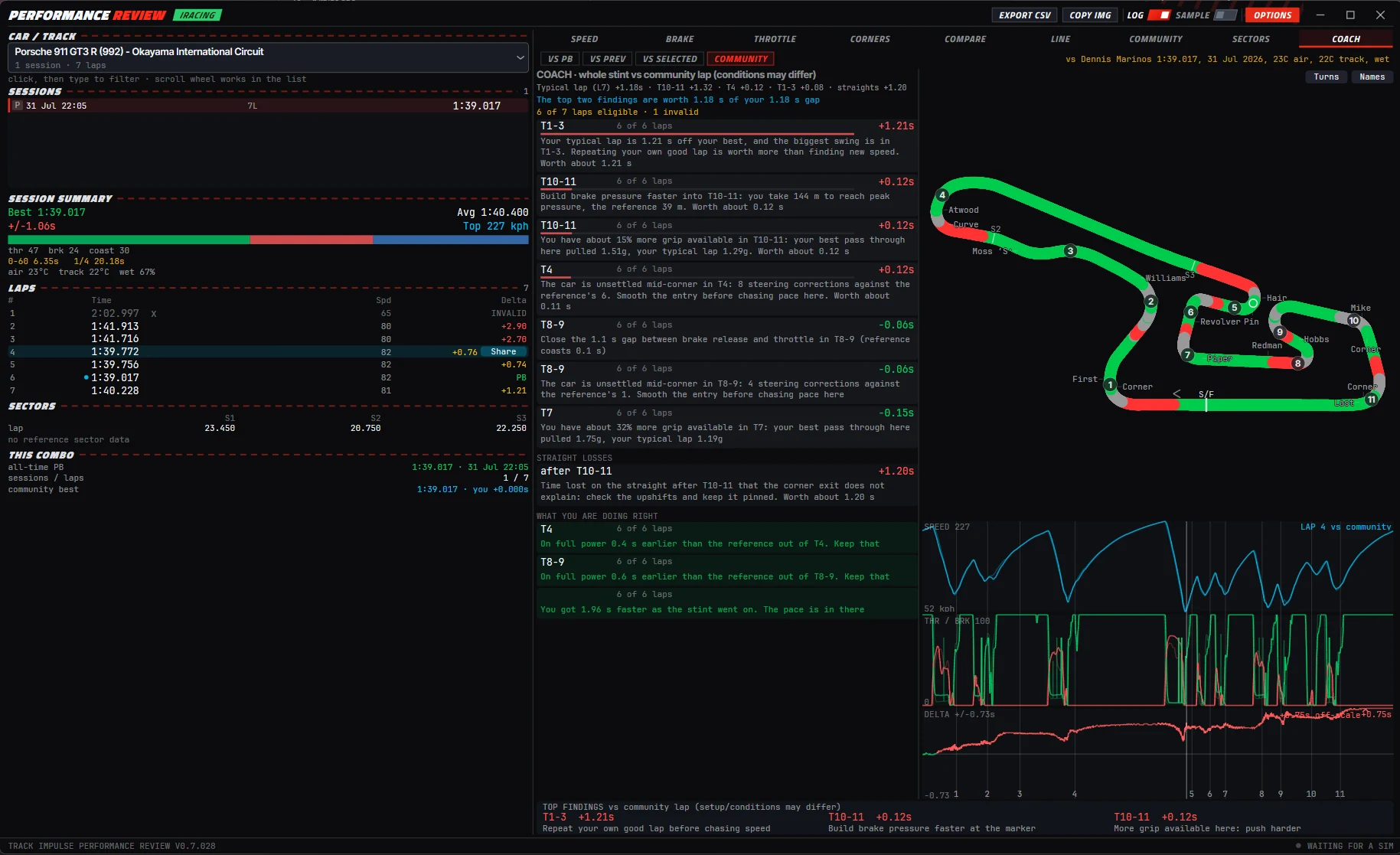
The Track Impulse Performance Review window on the Coach tab for a Porsche 911 GT3 R at Okayama in iRacing: session and lap lists on the left, ranked coach findings for T1-3, T10-11, T4, T8-9 and T7 in the centre with a cost in seconds on each, a straight losses block, a what you are doing right list, a track map coloured by throttle and brake, and speed, pedal and delta traces.

The Coach tab, iRacing. Every finding carries a cause, a target and a cost in seconds.

At a glance

Telemetry Tools Show You Where. This One Shows You Why.

Every telemetry tool can tell you that you were slow in Turn 5. Performance Review measures what you did with the brake, the throttle and the wheel, then says which of those cost you the time, by how much, and what to change. It is measured telemetry analysis, not a prediction engine, so every number on screen traces back to a lap you actually drove.

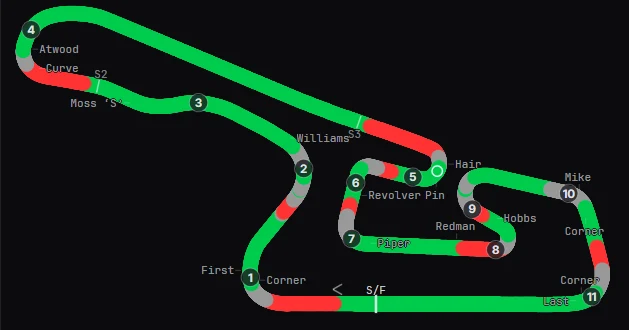
Where The Okayama circuit drawn from recorded laps and coloured by pedal input: red where the brake is applied, green where the throttle is open, grey where the car is coasting, with numbered turns and corner names.
Where A map of the lap with the braking zones marked. Useful, and roughly where most telemetry tools stop.
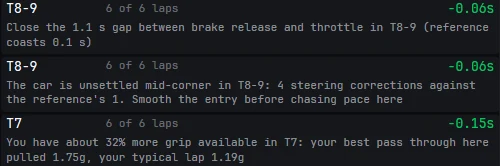
Why Three coach findings from the same lap: close the 1.1 second gap between brake release and throttle in T8-9 where the reference coasts 0.1 seconds; the car is unsettled mid-corner in T8-9 with 4 steering corrections against the reference's 1; and 32 percent more grip is available in T7 where your best pass pulled 1.75g against a typical 1.19g.
Why The same lap, in sentences. A coast you did not need, an unsettled entry, and grip you never used, each with a cost.
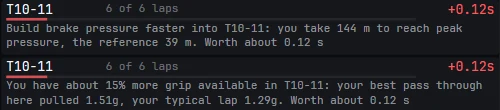
Two coach findings for Turn 10 to 11, each worth 0.12 seconds: one saying to build brake pressure faster because you take 144 metres to reach peak pressure against the reference's 39 metres, the other saying 15 percent more grip is available because your best pass pulled 1.51g against a typical 1.29g.
Cause Two findings, same corner. One is a braking technique problem, the other is unused grip. Each is priced at 0.12 s.
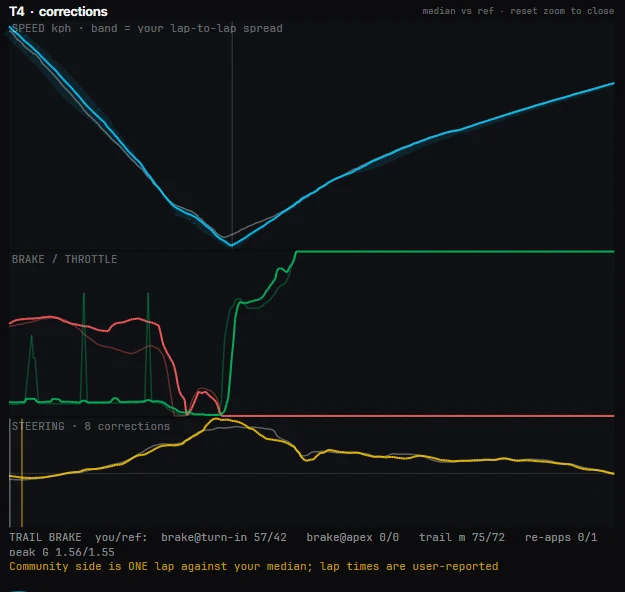
A coach finding for Turn 4 worth 0.12 seconds: the car is unsettled mid-corner with 8 steering corrections against the reference's 6, so smooth the entry before chasing pace.
Cause Steering is read too. Eight corrections against the reference's six means the entry is the problem, not the pace.
01 / The finding

It Names the Cause,
Not Just the Gap.

A lap time tells you the total. A delta trace tells you where. Neither tells you what you did wrong. The Coach names it: over-slowed entry, arriving too fast and paying on exit, coasting between the pedals, a lazy trail brake, an abrupt brake release, the wrong gear on exit, an unsettled entry, or grip you are simply not using.

One cause, one instruction, one number. And no finding ships without a target to drive to, so you always know what to change, by how much, and what it pays.

"Build brake pressure faster into T10-11: you take 144 m to reach peak pressure, the reference 39 m. Worth about 0.12 s"

"Close the 1.1 s gap between brake release and throttle in T8-9 (reference coasts 0.1 s)"

Real output, iRacing, Porsche 911 GT3 R at Okayama
The coach header for a whole stint against a community lap: typical lap 1.18 seconds off, split into T10-11 1.32, T4 0.12, T1-3 0.08 and straights 1.20, with a line stating the top two findings are worth 1.18 seconds of your 1.18 second gap, from 6 of 7 eligible laps with 1 invalid.
Budget The split, the priority line, and how many laps it is built on, in three rows.
02 / The time budget

A Lap Breakdown
That Actually Adds Up.

The Coach splits your lap into sections and puts a cost on each one. Those costs sum to your real lap delta, to the hundredth. 1.18 s off: T10-11 costs 1.32, T4 costs 0.12, T1-3 costs 0.08, straights cost 1.20. Nothing is hand-waved and nothing goes missing.

It also does the prioritising for you. One line states how much of your gap the top findings account for, so you know whether you are chasing one big fix or five small ones before you go back out.

  • A cost in seconds on every corner and every straight
  • Findings ranked by what they are worth, not by turn number
  • A single line for how much of the gap the top two cover
  • Every number tied to the laps it came from
The top findings bar along the bottom of the window: T1-3 worth 1.21 seconds, repeat your own good lap before chasing speed; T10-11 worth 0.12 seconds, build brake pressure faster at the marker; T10-11 worth 0.12 seconds, more grip available here, push harder.
Priority The three findings that matter sit pinned along the bottom of the window, in plain language, while you are still in the pits.
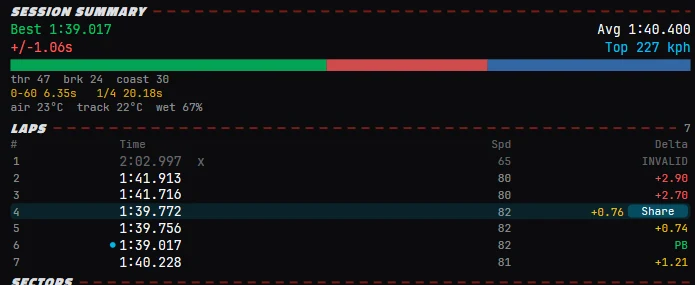
The session summary and lap list: best 1:39.017, average 1:40.400, a throttle brake and coast split of 47, 24 and 30 percent, 0 to 60 in 6.35 seconds, top speed 227 kph, air 23C and track 22C, then seven laps with times, top speed and delta, lap 1 marked invalid and lap 6 marked as the personal best.
Stint Seven laps, one marked invalid and excluded. Advice is built on the six that were really yours.
03 / The sample

Coached on Your Whole Stint,
Not One Hero Lap.

One lap can lie. A single clean lap flatters you in the corners you got right and hides the habit that costs you every other lap. The Coach reads all of your clean laps together and tells you how many laps each finding is based on, so you are coaching the habit, not the fluke.

Dirty laps never get a vote. Out-laps, in-laps, invalid laps and laps spent stuck behind another car are excluded automatically, and the window shows you which ones were left out and why. And when your own typical lap is a long way off your own best, it says so, because repeating a lap you have already driven is cheaper than finding new speed.

"Your typical lap is 1.21 s off your best, and the biggest swing is in T1-3. Repeating your own good lap is worth more than finding new speed. Worth about 1.21 s"

Coach output, 6 of 7 laps eligible
The corner detail pane for Turn 4 titled corrections: a speed trace with a band showing your lap-to-lap spread against the reference, a brake and throttle trace, a steering trace labelled 8 corrections, and a trail brake row reading brake at turn-in 57 against 42, brake at apex 0 against 0, trail metres 75 against 72, re-applications 0 against 1 and peak G 1.56 against 1.55.
Detail Focus a corner and the Coach opens the evidence: speed spread, pedals, steering and the trail brake measured against the reference.
04 / The technique

Trail Braking and Steering,
Measured.

Trail braking is where lap time hides, and almost nothing shows you yours. The Coach measures how you actually release the brake: how much pressure you carry to turn-in and to the apex, how far the release takes, whether it is one clean taper or a series of stabs, and how much of the tyre you are using while you do it.

Steering gets the same treatment. Corrections mid-corner are counted against the reference, so an unsettled car shows up as a number rather than a feeling. This is the stuff a human driver coach charges by the hour for, and it runs on every lap you drive.

  • Brake pressure at turn-in and at the apex, yours against the reference
  • Trail distance in metres, and how many times you re-applied
  • Peak G through the corner, so you can see the grip you left
  • Steering corrections counted, mid-corner, per turn
Two things most tools never show you

What You Are Doing Right,
and Where the Straight Went.

It keeps a list of your gains

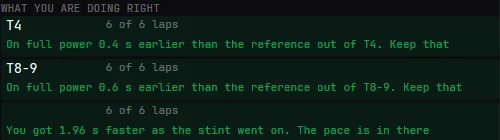
Real coaching is not just a list of faults. Alongside the problems, the Coach keeps a separate list of what you already do better than the reference: more apex speed here, on the power earlier there, a proper trail brake into the hairpin. Knowing what to keep matters as much as knowing what to fix, and it tells you when your pace is building through a stint.

The what you are doing right list: on full power 0.4 seconds earlier than the reference out of T4, on full power 0.6 seconds earlier out of T8-9, and a note that you got 1.96 seconds faster as the stint went on.
Gains Green means keep doing it.

Straights get blamed on the corner

Exit a corner two kph down and you bleed time all the way down the next straight. Most tools report that as a straight-line loss, which is useless, because the straight is not the problem. The Coach attributes the loss to the corner exit that caused it, and when the exit does not explain the loss it says so and points at the gearing instead.

A straight losses finding worth 1.20 seconds: time lost on the straight after T10-11 that the corner exit does not explain, so check the upshifts and keep it pinned.
Straights 1.20 s on one straight, traced back to a cause.
The this combo panel showing an all-time personal best of 1:39.017 set on 31 July 2026, one session across seven laps, and the community best of 1:39.017 with your gap to it.
Combo Your all-time best for this car and track, next to the community best.
The trail brake comparison row with a note that the community side is one lap against your median and that lap times are user-reported.
Honest The app states the limits of the comparison on screen: one community lap against your median.
05 / The reference

Compare Against Real Laps
From Real Drivers.

A leaderboard gives you a number to feel bad about. Performance Review lets you download the whole lap. Pull a reference lap from another driver in your car at your track, with the full telemetry trace, then overlay their brake pressure through a corner against yours and see exactly how they do it.

Sharing is opt-in and anonymous by default, and you control every lap you share. Because the laps come from other drivers rather than an official timing feed, the conditions and the setup can differ, so the window says which lap you are up against and in what weather. Nothing is dressed up as a verified record.

  • Coach against your PB, your last lap, any lap you select, or a community lap
  • Community laps arrive with full telemetry, not just a time
  • Weather, track temperature and date shown on every reference
  • Share a lap with one click, unshare it just as fast
The reference selector row: buttons for VS PB, VS PREV, VS SELECTED and COMMUNITY, with the community lap identified as Dennis Marinos 1:39.017 on 31 July 2026 in 23C air and 22C track on a wet surface.
Reference Coach against your PB, your previous lap, any lap you pick, or a community lap. The date and the conditions sit on screen so you can judge the comparison yourself.
What the Coach measures

Every Finding Type,
and What You Get Back.

Each row is a real class of finding the Coach produces from your telemetry. The wording changes with your data, the shape does not: a cause, a target, and what it is worth.

Finding
What it tells you
You get
Brake point
You brake earlier than the reference and give up entry speed
Metres later + kph to the apex
Brake build
Pressure comes on too slowly: 144 m to peak against a reference 39 m
Target distance to peak
Trail brake
You release too early and unload the front before the apex
Pressure to hold at the apex
Coasting
A gap between brake release and throttle the reference does not take
Seconds of coast to remove
Unused grip
Your best pass pulled 1.51g here, your typical lap only 1.29g
Percent of grip left on the table
Unsettled entry
8 steering corrections mid-corner against the reference's 6
Correction count, per turn
Straight loss
Time bled down the straight, attributed to the exit that caused it
Exit fix, or check the upshifts
Consistency
Your typical lap is 1.21 s off your own best, and where the swing is
The corner to repeat first
Gains
On full power 0.4 s earlier than the reference out of T4
Keep doing this
In development

Approved and being built for the next rounds of the Coach, clearly separated from what ships today:

  • Line coaching. Using your recorded driving line to spot road left unused on corner exit.
  • Pedal finesse. Slow brake pressure build-up and throttle stabs on exit.
  • Habit detection. When the same mistake shows up in three slow corners, it gets called what it is: one fix, not three findings.
06 / The suite

Nine Views on Every Stint,
Not Just a Coach.New

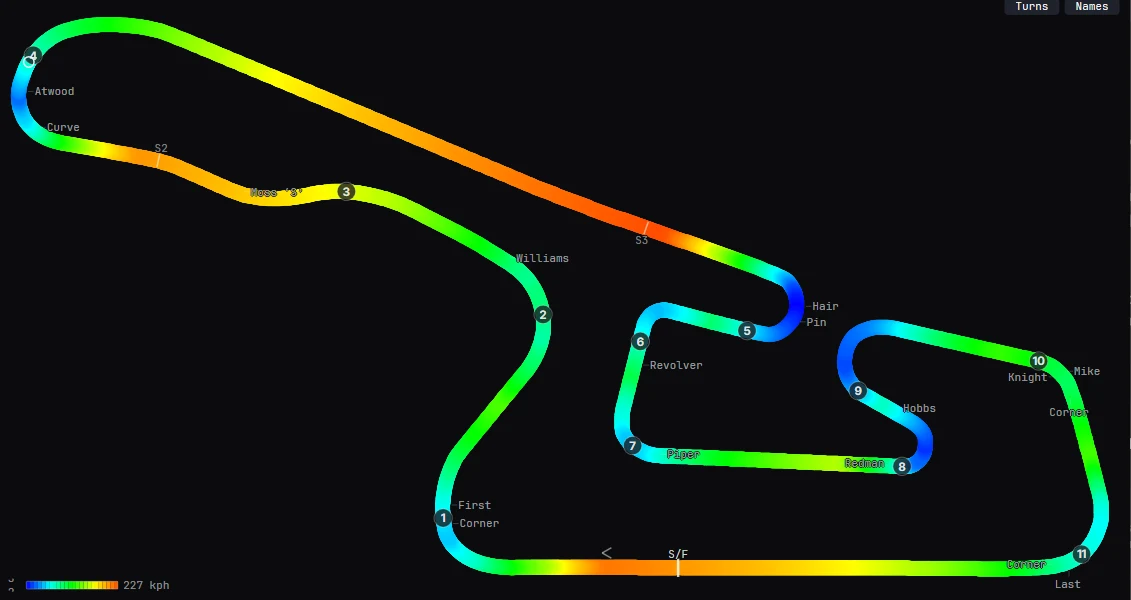
The Coach is the headline, but it sits inside a full review app. The track layout is learnt from your own laps and drawn to scale, then painted with whatever you want to see: speed, brake pressure, throttle. Click a corner and the detail pane opens your speed, brake, throttle and steering against the reference.

The Speed view: the Okayama circuit drawn to scale from recorded laps and coloured by speed from blue through green and yellow to red, with numbered turns, corner names, sector markers and a colour scale topping out at 227 kph.
Speed view The layout is learnt from your laps, then coloured by speed. Brake and throttle get their own maps.
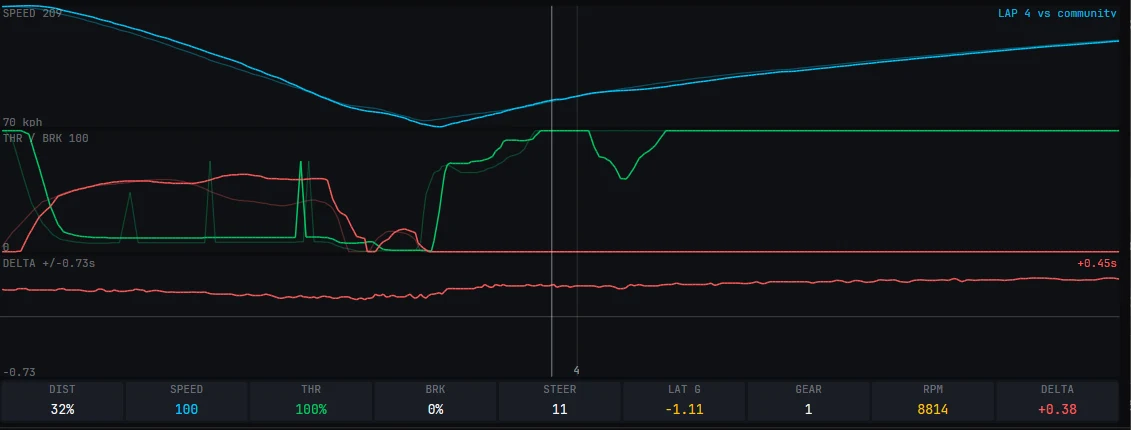
The trace panel under the map: a speed trace for lap 4 against the community lap, a throttle and brake trace, a delta trace reading plus 0.45 seconds, and a readout row showing distance, speed, throttle, brake, steering, lateral G, gear, RPM and delta at the cursor.
Traces Speed, pedals and delta under the map, with a live readout at the cursor.
View
What it gives you
Speed
The track coloured by speed, with your trace against the reference
Brake
Where and how hard you brake, mapped onto the circuit
Throttle
Where you are on the power, and where you are not
Corners
A corner-by-corner breakdown with a detail pane per turn
Compare
Any two laps overlaid, with the delta between them
Line
Your driven line against the reference, metre by metre
Community
Shared laps for your car and track, with full telemetry
Sectors
Sector times and sector deltas across the stint
Coach
Ranked findings with a cause, a target and a cost in seconds
Yours, on your PC

Your laps live on your own machine and the analysis runs locally. There is no cloud telemetry service and no monthly fee to look at your own driving. The internet is only involved if you want community laps. Every lap can also leave as CSV, or the window as an image, if you want to take it elsewhere.

One install

The Review App Comes With
The Rest of It.

Performance Review ships inside Track Impulse, next to 20 on-screen overlays and the haptic engine. That means one download gives you the lap analysis, a radar spotter, relative, standings, a fuel calculator and a dashboard, plus telemetry to bass shaker in as low as 2ms. Measured head to head in iRacing, that path runs at 8ms against SimHub's 137ms.

The haptics are optional. If you never plug in a bass shaker, the review app and the overlays work exactly the same. If you do, the per-corner effect engine is already installed, and the same telemetry feeding your coach is feeding your seat.

Performance Review

Nine views, the Coach, community laps and CSV export. iRacing only for now.

20 overlays

Radar spotter, dashboard, relative, standings, fuel, battle bar and more, across 10 sims. See them.

Haptic engine

Per-corner, physics-derived bass shaker effects at as low as 2ms. See the effects.

FAQ

iRacing Lap Analysis:
Common Questions.

What is Performance Review?
Performance Review is the lap analysis and driving coach built into Track Impulse. It records every iRacing lap automatically at 60 samples a second, then breaks your stint down across nine views: speed, brake and throttle heat maps, corner detail, lap comparison, driving line, community laps, sectors and the Coach.
Which sims does it work with?
iRacing only at the moment. The Track Impulse overlays and the haptic engine cover ten sims, but the lap recording and coaching in Performance Review are iRacing-specific.
Do I need to start a recording?
No. There is nothing to start, stop, configure or export. Run iRacing and every lap is captured while you drive, practice, qualifying and race alike. Open the window afterwards and the whole stint is already there.
Is it AI coaching?
No. It is measured telemetry analysis. Every sentence comes from numbers taken off your own laps, which is why each one carries the figures behind it and why the corner costs sum to your real lap delta. It cannot invent a finding that is not in the data.
Does it need an internet connection or a subscription?
No. Your laps stay on your own PC and the analysis runs locally. There is no cloud telemetry service and no monthly fee to see your own driving. The internet is only used if you want to download or share community laps.
Where do community laps come from?
From other Track Impulse users who chose to share them. Sharing is opt-in and anonymous by default, and each lap arrives with its full telemetry trace, not just a time. Because they are user-shared, conditions and setups can differ, so the app shows the date, air and track temperature and weather on every reference lap.
How much does it cost after beta?
Performance Review and the overlays are free during the public beta, and their pricing after beta has not been set. The published prices today cover the haptic engine: $2.50 a month or $29.99 one-time, and activating during beta locks the lifetime price at $24.99. See the pricing section for the detail.
Can I get the data out?
Yes. Any lap can be exported to CSV, and the window itself copies to an image in one click for sharing a finding in Discord or a forum thread.

Updated 2 August 2026 · Written by Dennis Marinos, Track Impulse

Get Performance Review

Drive. Then Find Out Why.

Install Track Impulse, drive an iRacing session, and open Performance Review. Your whole stint is waiting, coached, corner by corner. Free during beta. No credit card.