The Driving Coach
Track Impulse is a sim racing coach for iRacing, Le Mans Ultimate and AC EVO. In the car it names one thing to change for the corner ahead and says it out loud. After the session it ranks what to change first and draws the corner on the road, with a cause, a target and a cost in seconds on every finding. Free during the public beta, $3 a month after.
iRacing
Le Mans Ultimate
AC EVO
01 At a glance
Most coaching tools do one or the other. A live coach shouts at you and leaves nothing to study. A telemetry tool hands you charts and leaves you to work out what they mean. Track Impulse does both halves, from the same measured data, and the second half explains the first.
Spoken aloud and shown on the overlay. What to change, how much, what it is worth, and how much time you have found. Nothing to read mid-corner. See the Live Coach
Each corner drawn on the road, and a time budget that adds up to your real lap delta. Every finding names the cause, gives a target and states what fixing it pays, in seconds. See the review
Both halves are grounded in real coaching practice: the analysis rules are built on the methods professional coaches use, threshold braking, trail braking, the traction circle, the phases of a corner. Not generic stats.
02 In the car Pro Free during the beta
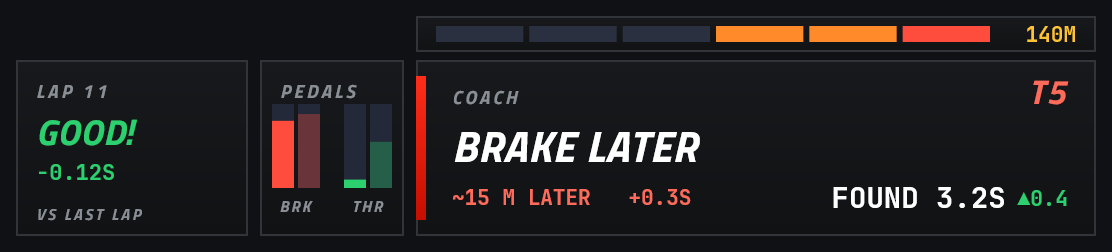
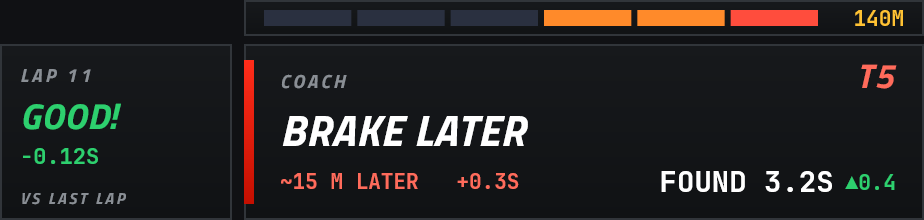
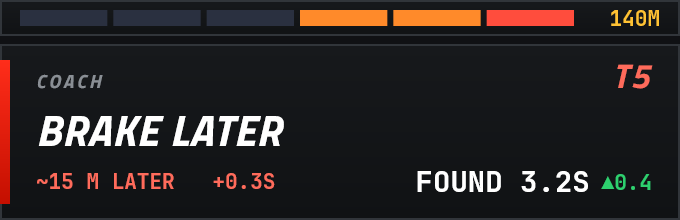
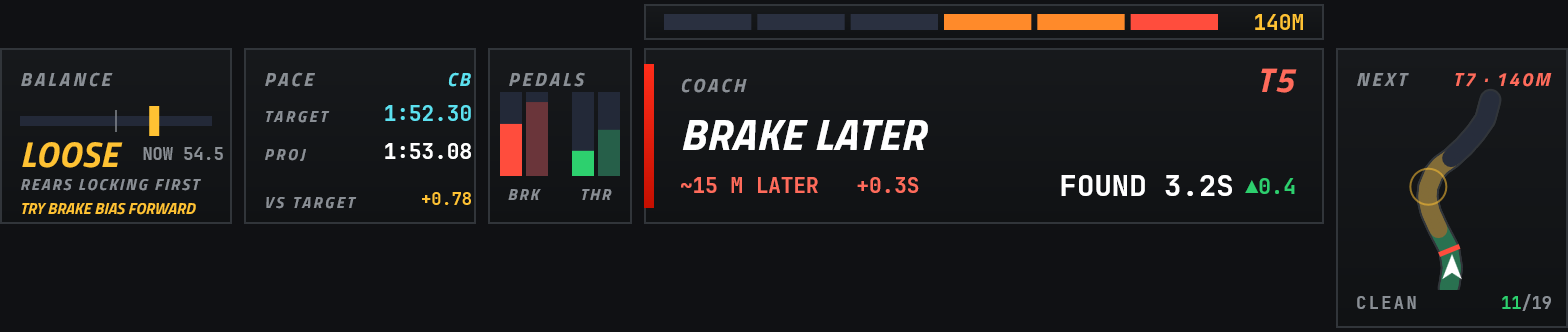
The live coach picks the single biggest thing you can change for the corner you are about to enter, and says it. Brake later, about 15 m, worth 0.3 s. Not a wall of numbers, not a chart to read at 180 kph. One correction, sized, priced, spoken.
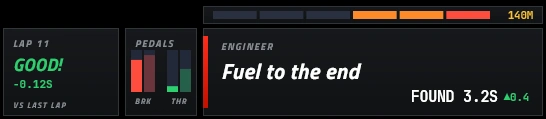
BRAKE LATER · T5The one instruction, and the corner it is for~15 M LATERThe size of the correction+0.3SWhat it is worth, before you try itFOUND 3.2STime found in this car at this track since coaching started. It can only rise140MThe braking bar drains as you reach your reference lap's braking pointGOOD! -0.12SA call-out the moment a lap beats your last oneThese are the coach's own recordings, the ones the app ships with: one of its wordings of "brake later" in each of the eight languages it speaks, and one Race Engineer call. Every tip has several wordings, and the coach never repeats the one you just heard.
You're braking too early, brake later.Du bremst zu früh, brems später.Tu freines trop tôt, freine plus tard.Stai frenando troppo presto, frena più tardi.Estás frenando demasiado pronto, frena más tarde.Você está freando cedo demais, freie mais tarde.ブレーキが早すぎます、もっと奥まで我慢して。你刹车太早了,再晚一点刹。Fuel's good to the end.The tip appears a few seconds before the corner it is about and is gone by the time you get there. A tip that would land after the corner is dropped, never said late.
It keeps score honestly. The found figure is time you have actually taken out of your lap since the coaching started, not a projection of what you might gain. It is kept per car and track and it keeps growing across sessions. Real units a racer brags in, not an invented score.
03 The map Pro Optional
The coach looks as it always has. Switch on the Racing Line window and a zoomed map sits underneath it, turning with your car: where you are against your best lap's line, where that lap braked, coasted and got back on the throttle, plus kerbs, brake points and a ghost car.
Beside it, the Compare panel shows both laps' pedals, steering, slip and braking point, then a short verdict on the corner you just left. All of it is optional, and each row of Compare has its own switch, so it can be as busy or as quiet as you like.
Prefer the road straight ahead? Approach view turns it into a lane, with brake boards counting down to your best lap's brake point, then turn-in, apex and throttle marks, and the next corner's target speed and gear. Le Mans Ultimate and AC EVO get both views. iRacing uses Approach, because iRacing does not report where your car sits across the road.
150 · 100 · 50Brake boards before your best lap's brake pointBRAKED 25 M EARLYA verdict card slides out after the corner6 ROWSPedals, steering, line, balance, brake point, last corner. Each one switches offABOUT 4 S AHEADAuto zoom shows 80 to 300 m of road, closer in slow corners04 Also in the car
The coach still gives one correction at a time, spoken before you reach the corner. What has grown is everything around that call.

Everything. All panels, spoken tips, the braking tone, chimes and nudges on.

Focused. Tips and the feedback panel. No extra panels, no chimes, no nudges.

Minimal. One written tip after each lap. Nothing else, and silent.
Three presets set how much of the coach is on your screen and in your ears. Under them, a slider sets how far down your costliest corners it goes: at the low end you only hear about your worst corner. Seven headings, from braking to consistency, each have their own switch, and so does every tip under them.
| Heading | Tips you can switch off one by one |
|---|---|
| Braking too cautiously | Braking too early, not braking hard enough, too slow before a short straight |
| Overdriving the entry | Braking too late |
| Coming off the brake | Off the brake too soon, snapping off the brake, done braking before you turn |
| Coasting | Time spent on neither pedal |
| Getting off the corner | Slow to get on the power, not using the exit road, wrong gear or a mistimed shift, apexing too early |
| Steering and line | Turning in early, the car not turning, or sliding |
| Consistency and habits | Lap-to-lap consistency, habits across several corners |
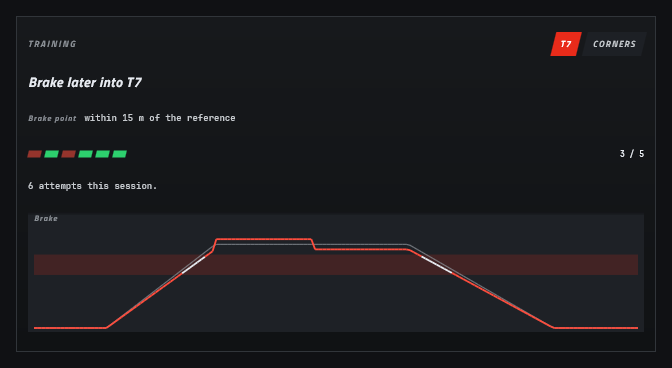
Press Practise in Performance Review and the Training overlay gives you one target, a pass or miss, and a streak. On iRacing, in practice, it can reset you to loop the corner.

On a car and track you have never driven, it compares you with the best community lap and says so. Spoken in English, German, French, Italian, Spanish, Portuguese, Japanese and Chinese.


The panel in each of the app's seven interface languages. Chinese is a spoken voice only.
Optional, in iRacing and Le Mans Ultimate: gaps and trends, rivals pitting, fuel and pit window, flags, penalties, damage, rain and your result. It only speaks when something changes, and never in a battle.

If a tip has not helped after three laps, the coach rests it and works on something else, in different words, so it does not nag.
Occasional nudges to settle you after a spin, when you are forcing it, or when to bank a clean lap. On a wet track in iRacing or Le Mans Ultimate it swaps to a wet playbook.
05 When it speaks, and when it does not
The fastest way to kill a live coach is to let it nag. This one knows coaching belongs in practice: in a race it coaches after each lap, and corner calls stay off unless you invite them. Racing comes first. Coaching fits in the gaps.
| Situation | What the coach does |
|---|---|
| Practice, qualifying and testing | Speaks One call for the corner ahead, and a verdict after each lap |
| A race | After each lap Corner calls stay off unless you opt in |
| A battle, or side by side | Silent Tips are suppressed |
| Yellow flags and pit road | Silent Tips are suppressed |
| Fewer than three clean laps on record | Silent It shows a learning indicator while it gets there |
| A tip that has not helped after three laps | Rested It works on something else, in different words |
| Two tips close together | Held Tips are rate-limited, and you set the minimum gap |
| A track you have never driven | Guide Switch on the new-track guide and it talks you around the opening laps |
It never coaches from thin air. The coach stays silent until it has three clean laps of you on record, and shows a learning indicator while it gets there. Advice built on one wobbly lap is guesswork, and guesswork is the one thing it is not allowed to say.
Arrive somewhere you have never driven and you can switch on the new-track guide. It talks you around the opening laps corner by corner: hard braking, light braking, flat out. Once it knows your driving, it hands you to the real coach.
06 After the session
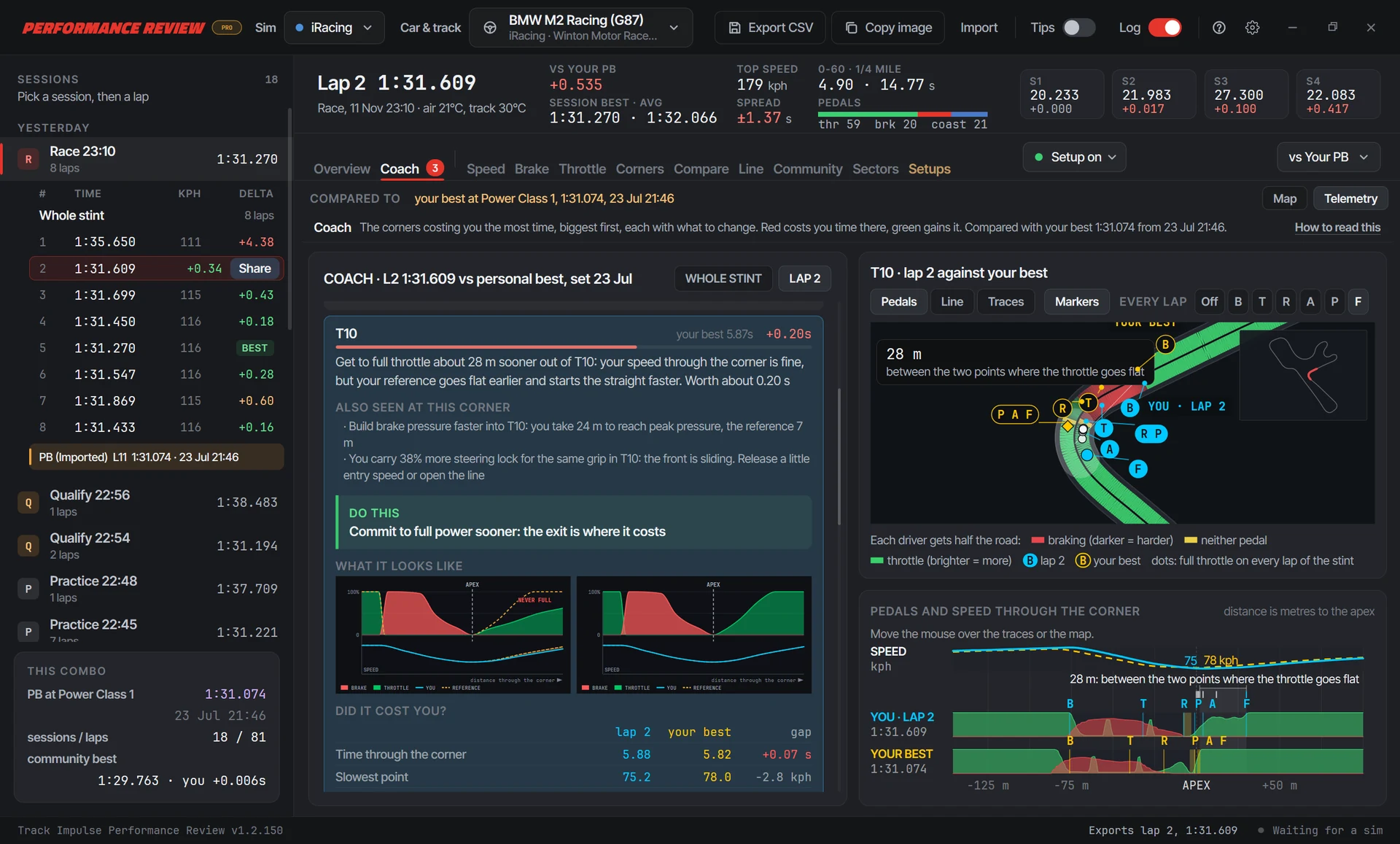
Live coaching leaves nothing to study, so the car is only half of it. Get out and Performance Review has your whole stint ready: what to change first, each corner drawn on the road with your pedals on it, a picture of the mistake and the fix, and whether it really cost you.

It is measured telemetry, built on the methods professional coaches use, and the costs sum to your real lap delta. It also keeps a list of what you already do better than your reference, so you know what not to touch, and a Fixed list of what you have sorted out, with the time you have found since the coaching started.
07 Felt, not just heard
Track Impulse is haptics software first, and the coach uses that. Switch on the cue and it marks the reference braking point with a pulse through your rig, so the brake later you just heard becomes a point you feel arrive.
A short pulse at the point your reference lap got on the brakes, in the corners where you are missing it. It marks the place, the way a braking board does. It does not tell you what to do. The pulse plays through the ABS effect, so that effect has to be switched on. No shakers? The same cue plays as a short tone.
It runs in a separate process, completely off the haptic engine's audio path. Your effects still arrive in as low as 2 ms, coached or not. Filmed head to head in iRacing, telemetry reaches the shaker in 8 ms against SimHub's 137 ms. See the haptics
Telemetry to bass shaker, filmed at 240 frames a second in iRacing.
08 What coaching costs
This is a crowded category and it is worth seeing the whole of it. Live spoken coaching is no longer a premium feature. Full Grip Vision includes coaching in its free tier, and the best known paid one, trophi.ai, is $7.50 a month on its annual plan. Track Impulse Pro is $3 a month once the beta ends, and every Pro feature is free until then. Price is not the reason to pick this one, so the rest of this page is about what it actually does with your lap.
| Coach | Free tier | Paid | Live voice coach |
|---|---|---|---|
| Track Impulse | 16 overlays, permanent | $3.00 a monthAfter the beta. Every Pro feature is free during the beta | Yes |
| Full Grip Vision | Coaching level 1, overlays | EUR 3.99 to 9.99 a month | Yes |
| Telemetry Copilot | 5 analyses a month | EUR 4.99 to 19.99 a month | No |
| Garage 61 | Full analysis, 1 year of data | EUR 5 a month, billed yearly | No |
| Track Titan | Yes, without AI tips | $7.99 to $19.99 a month | No |
| Virtual Racing School | Basic, 3 months of data | $4.99 to $9.99 a month, packs extra | No |
| Coach Dave Delta | None | $12.49 a month, $109 a year | No |
| trophi.ai | 7 day trial | $7.50 a month, billed yearly | Yes |
| TrackPro | App free, 30 day coach | $20 to $297 a month | Yes |
Competitor pricing checked 2 November 2026 from each product's public pages. Annual plans are shown as their per month equivalent: trophi.ai charges $89.99 a year up front, or $14.99 month to month, Coach Dave Delta is $109 a year, and Garage 61 quotes its EUR 5 only on the yearly plan. TrackPro's $20 tier meters how much coaching you get, and its $97 and $297 tiers buy five times and twenty times that allowance. Virtual Racing School has no automated voice coach, though it does sell live human coaching from $29.99 a session. Tiers change; check before you buy.
Sixteen overlays are free permanently, with no credit card, no quotas and no trial clock: the radar spotter, relative, standings, fuel calculator, inputs dash, shift light, battle bar, live track map, session info and the pit helper among them. You never need Pro to race safely. Pro is the power tools, and every Pro feature is free for the whole public beta. See the free overlays
09 Sim support
Coaching needs telemetry channels that not every sim publishes. iRacing, Le Mans Ultimate and AC EVO give the Coach what it needs, and all three get live coaching and the whole post-session breakdown. The overlays and the haptic engine cover far more, so the app is still worth installing for a sim the Coach cannot read yet.
| Sim | Coach | Overlays | Haptics |
|---|---|---|---|
| iRacing | Yes | Yes | Yes |
| Le Mans Ultimate | Yes | Yes | Yes |
| AC EVO | Yes | Yes | Yes |
| Assetto Corsa Competizione | Not yet | Yes | Yes |
| Assetto Corsa, AC Rally | Not yet | Yes | Yes |
| Automobilista 2, F1 25 | Not yet | Yes | Yes |
| rFactor 2, RaceRoom | Not yet | Yes | Yes |
| BeamNG, DiRT Rally 2.0, EA WRC, ETS2 | Not yet | Yes | Yes |
Fourteen sims for overlays and haptics. Coaching in three, with more as their telemetry allows. The Racing Line window's Map view is Le Mans Ultimate and AC EVO only, and the Race Engineer is iRacing and Le Mans Ultimate.
10 FAQ
Straight answers, including the ones a reviewer would ask: whether this is AI, whether it replaces reading your own telemetry, and what it does not do.
The word is doing a lot of work in this category. Almost every coaching tool on the market, this one included, is algorithms reading telemetry, and live coaching in particular leaves no room for a round trip to a language model between one corner and the next. So the label tells you very little. What tells you something is whether the output is checkable. Every finding here carries the figures it came from, and the corner costs sum to your real lap delta. Nothing gets said that the telemetry does not support.
Yes. The live coach names one change for the corner ahead and speaks it aloud, with the size of the correction and what it is worth. It also shows a running total of the time you have found. Several tools now do live coaching, and Full Grip Vision has a free entry tier, so it is worth trying a few before you settle. The thing this one will not do is fill silence with advice it cannot back: if the telemetry has nothing specific to say about the corner ahead, it says nothing. It also knows its place. In a race it coaches after each lap and keeps corner calls off unless you opt in, and even when you do, tips are suppressed in battles, side by side, under yellow flags and on pit road. A tip that has not helped after three laps gets rested.
iRacing, Le Mans Ultimate and AC EVO. All three get live coaching, every lap recorded and the whole post-session breakdown. Each sim keeps its own lap history. The overlays and the haptic engine cover fourteen sims, but coaching needs telemetry channels the others do not publish yet.
The Coach is an Overlays Pro feature, and every Pro feature is free for the whole public beta. After the beta Pro is $3 a month, subscription only, cancel anytime. Sixteen overlays stay free permanently, so you never need Pro to race safely. See the overlay pricing.
No. There is nothing to start, stop, configure or export. Run iRacing, Le Mans Ultimate or AC EVO and every lap is captured while you drive, practice, qualifying and race alike. Open Performance Review afterwards and the whole stint is already there.
You can switch on the new-track guide. It talks you around the opening laps corner by corner, hard braking, light braking or flat out, so you learn the circuit without alt-tabbing to a track guide video. Either way, on a car and track you have never driven, the coach compares you with the best community lap and says so. Once it has three clean laps of your own driving on record, it hands you to the real coach and the advice becomes about how you drive, not generic.
No. The coach runs in a separate process, completely off the haptic engine's audio path, so it has zero impact on your bass shaker effects. They still arrive in as low as 2 ms whether the coach is speaking or not. The coach can also use the shakers itself: an optional haptic pulse at the reference braking point, felt through the rig.
Not unless you choose to share. Your laps stay on your own PC and the analysis runs locally, with no cloud telemetry service. The internet is used for community laps: on a first drive the app fetches the best community lap as your reference. Sharing your own laps is your choice, and a shared lap shows an alias you pick, never your name or email.
Your own personal best, any lap you select, a community lap shared by another driver, or, with eight or more laps in a session, your own quicker laps with no reference at all. Community laps arrive with their full telemetry trace, not just a time, and each one shows its date, air and track temperature so you can judge whether the conditions were comparable. You can browse every shared community lap before you install anything.
This is the fair criticism of the whole category, so it deserves a straight answer. The charge is that a coach stops helping the moment you can read a brake trace yourself, and that free telemetry tools cover the rest. Reading traces is exactly what the post-session view automates. It prices every corner against your reference and the costs sum to your real lap delta, so the answer to where the lap time went arrives in seconds, not after an evening. If you enjoy the evening, every trace is there and any lap exports to CSV. If you would rather have the answer and go again, that is what this is for.
Every corner, every lap. The common complaint about coaching tools is being handed a tenth in two corners while still sitting most of a second off the reference, with nothing to explain the rest. The time budget is built so that cannot happen: every corner carries a cost in seconds, and those costs add up to the delta you actually drove. If a corner is not losing you time, it says so.
Driving comes first: where you brake, how you release it, where you get back to throttle and what each of those is costing. On iRacing, the Setups page in Performance Review also saves the setup you drove each session, shows which one produced your best laps and lists exactly which settings differ from your fastest. On GT3 cars, when the coach sees the same balance problem across several sessions and several corners, it offers one conservative change, like softening the front anti-roll bar a step, and tells you to fix the driving before you touch the car. If the pattern is not consistent enough to blame the car, it offers nothing. The page is new and marked experimental, and it will not build a setup for you. If you want ready-made setups, a setup shop is the better buy.
For finding lap time, it does the job a data engineer would do, on every lap, for $3 a month after the beta, and every Pro feature is free until then. The optional Race Engineer keeps you informed in a race, but it does not coach racecraft, strategy under pressure, or a situation the telemetry cannot see. A human coach is still better at those, and considerably more expensive.
Yes. Any lap exports to CSV, and the window copies to an image in one click for sharing a finding in Discord or a forum thread.
Updated 5 November 2026 · Written by Dennis Marinos, Track Impulse
Install Track Impulse, drive a session in iRacing, Le Mans Ultimate or AC EVO, and the Coach is already listening. Live in the car, and waiting for you afterwards with the whole stint broken down. Free for the whole public beta. No credit card.